B2B Website Strategy: From Building to Marketing
A lot of B2B websites are built like a brochure with a big hero headline and a vague promise, followed by a couple of nice visuals.
However, these websites often forget that they are not meant for broad audiences, and even if they attract a lot of traffic, that doesn’t necessarily mean it's quality traffic.
B2B websites' ICP includes specific decision-makers such as CMOs, CFOs, operations leaders, and technical stakeholders who need concrete proof, clear outcomes, and practical details to confidently move a deal forward.
When a potential prospect lands on your B2B website, what they really want is to understand whether your solution solves a clearly defined problem they have, delivers a believable financial or operational upside, and won’t create career risk for them if they champion it internally.
Your B2B website should help these very skeptical decision-makers do months of internal homework and support them through dilemmas, comparisons, and decisions, all within a single long sales cycle.
Let's take a look at what that means for B2B web development, design, content, SEO, strategy, and how you can accomplish it all with Webflow.
Start with Defining ICP and Mapping Out Their Buyer Journey
If you want to make a successful b2b website strategy, the first thing to keep in mind is that you are not talking to a persona, you are talking to the jobs happening inside a buyer's company.
Multiple stakeholders each have specific “jobs to be done” (justify spend, reduce risk, hit a KPI, integrate with existing tools, solve a particular problem), and your website has to speak to those real responsibilities.
That means that rather than having a neat linear funnel, you need a system designed for people who drop in at different stages with different questions. Such a system must include multiple touchpoints that each address a specific job, moment, and level of intent:
- Focused landing pages for specific campaigns, use cases, or industries
- Role-specific blog content that speaks directly to CMOs, CFOs, ops leaders, or technical stakeholders
- Problem-specific blog content that frames your solution around concrete pains and jobs-to-be-done
- Product and features pages that explain how things work, where the limits are, and what’s included
- Customized CTAs that match intent levels (e.g., “See ROI example” vs. “Talk to sales”) across pages
- Targeted banners and in-page promos that surface the right resources or offers based on context (page type, role, or stage)
All of these touchpoints need to be tailored to the roles you want to address and what they are trying to achieve.
Truly mapping out their buyer journey means understanding their thought process, the possible perceived risks, objections, and internal policies they worry about, and the kind of proof they need to move forward.
Once you have that defined, you can build a B2B website growth strategy that is grounded in reality. You will know what kind of design and development solutions you need, how many pages and page types to create, and what kind of content belongs on each.
How B2B Websites Should Talk
The golden rule of B2B communication: Don’t focus too much on increasing excitement; focus on reducing uncertainty instead.
Business executives aren’t really looking for vibes; they are looking for evidence-backed clarity, case studies, proof of concept, demos, and a clear value proposition.
That means that you need to have a crisp positioning statement about what you do, who it is for, and what outcomes can be expected.
Web design is extremely important here because your website needs to be structured in a way that's easy to navigate and makes all important information highlighted and accessible.
For example, when reading about your product features, the page design should incorporate highlighted, immediately clickable visuals that guide potential prospects to read about proof-of-concept material (case studies, metrics, benchmarks).
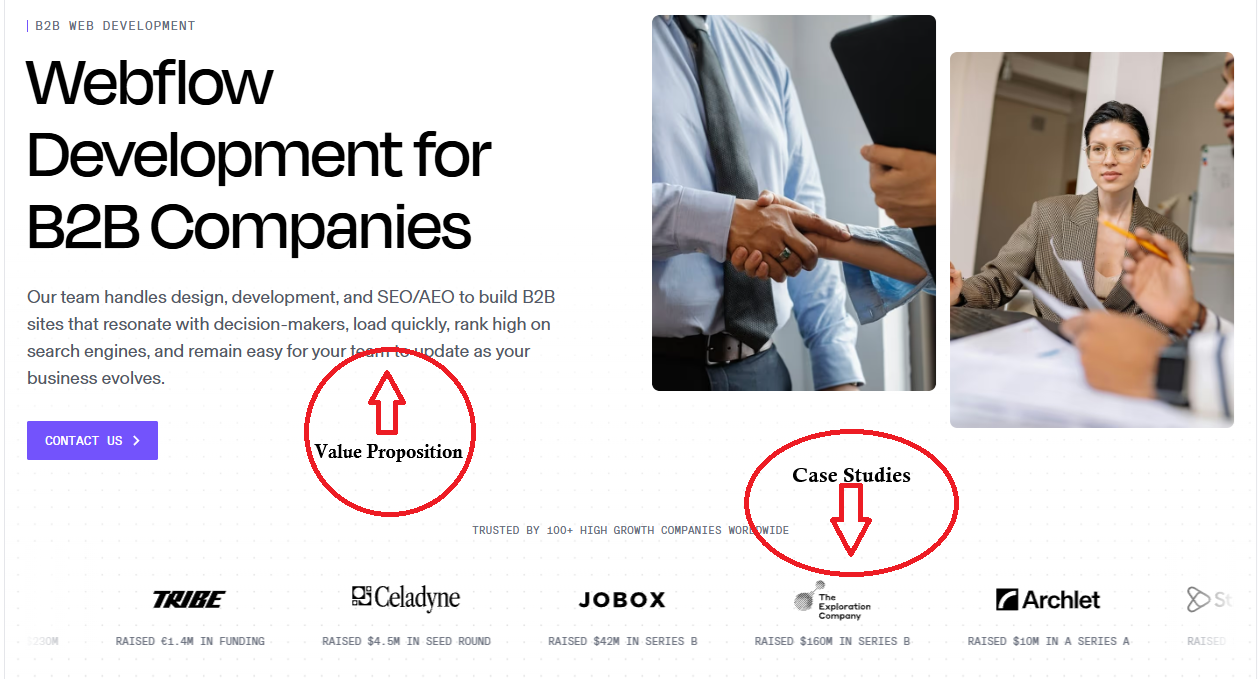
Example of how web design incorporates trust signals in an effective, hard-to-miss place.
B2B web design should include a mix of clear text that explains how your solution solves the problem and what it offers, along with trust signals that build credibility (such as case studies and funding logos).
The goal is to create an overall experience that quickly conveys credibility and trustworthiness, so prospects immediately feel they’re in good hands and are naturally drawn to explore deeper proof such as case studies, metrics, and demos.
A skillful designer can tie these elements together visually with layout, hierarchy, and subtle cues so decision-makers can’t miss the value story.
B2B providers are also advised to offer price transparency, or at least some ballpark figures and estimations (eg, most customers invest between $1k–$3k per month, depending on team size and required integrations). That’s because business executives are primarily interested in 3 hows: How much? How risky? How certain?
The pricing page should be treated as both a natural landing page from high-intent pages (features, comparison, ROI content) and a logical follow-up step from earlier-stage pages (use cases, blogs, case studies) through well-placed, contextual CTAs.
The B2B Website Features
Here’s the feature stack that supports how B2B is bought (and sold):
Core architecture pages:
- Homepage: positioning + proof + primary paths (by use case/industry/role)
- Product pages: what it does + how it works + boundaries (what it doesn’t do)
- Solution / Use case pages: “When you have X problem, we do Y outcome.”
- Industry pages: translate outcomes into that industry’s language + proof
- Integrations pages: compatibility + implementation notes (buyers demand this)
- Pricing page: at least representative pricing logic
- Security / Trust center: compliance, data handling, risk answers
- Case studies library: filterable, metric-led, role-based takeaways
- Resource hub: guides, templates, comparisons, webinars (SEO + enablement)
- Conversion pages: demo/contact, request pricing, book a call, talk to sales
Conversion UX that fits B2B reality
B2B pages should rarely have a single CTA or banner on every page. Instead, they should be tailored to a specific stage of the buyer's journey that matches page intent:
- High intent: Request demo, Get pricing, Talk to an expert
- Mid intent: See ROI, View case studies, Watch 2-min demo
- Low intent: Download template, Read the guide, Subscribe
Webflow is ideally suited to make this easy to systematize with components + CMS-driven pages, so CTAs don’t become a manual mess.
Creative B2B Webflow Solutions That Communicate Value
If your product is complex, don’t just describe it, show it. Webflow is especially strong here because you can blend CMS + interactions + custom code into business-grade experiences.
A few examples worth browsing:
- Covalent v3: includes an interactive labor effectiveness calculator so prospects can see value instantly (perfect CFO bait).
- LotWorks: ROI Calculator Integration: turns abstract benefits into concrete ROI projections and even implementation timelines.
- Regulatis demo: uses interactive sections + modular layouts to guide users through a complex product story.
For more inspiration, Webflow’s Made in Webflow gallery has a full B2B category to explore patterns you can clone and remix.
Idea starters you can build in Webflow (fast):
- ROI / pricing estimators (sliders, toggles, multi-step)
- “Pick your path” interactive solution finder (by role/industry/problem)
- Mini product tours (click-through UI stories)
- Case study “proof builder” (select company size + pain → see relevant outcomes)
- Comparison pages with interactive feature filters (great for SEO and sales enablement)
How Can Integrations Improve Your B2B Site
You can connect your site to tools like CRMs (HubSpot, Salesforce), marketing automation (Marketo), analytics (GA4), chat and scheduling tools, payment or billing systems, and more to capture leads, track behavior, and automate follow-ups, rather than doing everything manually.
Webflow makes this especially powerful because it supports hundreds of plug-and-play integrations via native apps, embeds, and no-code connectors like Zapier.
And if you need something more advanced, developers can drop in custom code or APIs so your site can talk to almost any internal or external system your business relies on.
Some of the most popular B2B website integrations include:
1) HubSpot (CRM + marketing automation)
HubSpot is the classic “turn visits into pipeline” integration, handling lead capture, tracking, and lifecycle automation for B2B websites. Connected to Webflow via app, embed, or API, it routes form submissions into workflows, powers scheduler embeds, and enables on-site personalization.
2) Marketo (enterprise-grade automation)
Marketo is a go-to automation platform for enterprise B2B, and when connected to Webflow via embedded forms or APIs, it powers scalable demand gen, clean field mapping, attribution, and personalized, account-based nurture journeys.
3) Google Site Tools (GA4 + Tag Manager + Search Console)
Google Site Tools are essential for B2B sites that rely on precise measurement. When Integrated with Webflow, they support clean conversion tracking, experiments, and SEO reporting that ties search performance to on-site behavior.
Increase B2B Website Visibility with SEO + AEO
Google’s guidance is boring, and that’s why it works. You need to follow all the technical best practices, create helpful content, and make your site easy to crawl, understand, and navigate.
What this means for B2B sites:
- Organize your content into clear topic groups around use cases, industries, and comparisons, using your CMS to keep URLs, tags, and structures consistent.
- Add internal links and simple navigation so people (and Google) can easily move between related pages and go deeper when they’re interested.
- Keep all key information in real text (headings, paragraphs, bullet lists), not just in images, videos, or animations, so it’s easy to scan and index.
- Create dedicated pages for real buying questions like implementation, migration, security, integrations, and pricing, and standardize them with reusable templates.
- Make sure your technical basics are solid: fast load times, mobile-friendly layouts, canonical tags, XML sitemap, and a clean robots.txt so important pages are discoverable and duplicates don’t compete.
AEO (Answer Engine Optimization)
AEO is the practice of optimizing content so platforms can deliver your content as the answer (snippets, voice, AI summaries, chat results).
Important nuance: Google says there are no special requirements beyond solid SEO to appear in AI Overviews/AI Mode, but best practices like clear structure, internal linking, and text-based content still matter.
Practical AEO practices for B2B pages:
- Under each H2, add a simple 2–3 sentence answer that explains what something is, who it’s for, and when to use it.
- Use “decision-ready” formatting: clear steps, tables, and bullet points that make it easy to pull out key information.
- Build these patterns into your design system and CMS templates, so every new blog, use-case page, or feature page follows the same clear structure.
- Add structured data (like FAQ, HowTo, Product, Organization) only where it accurately matches what’s visible on the page.
- Don’t rely on FAQ rich results as a “hack” (Google has limited them for most sites); instead, focus on strong content + clean structure + solid technical SEO.
What Content a B2B Site Actually Needs
Strong, strategic content is the engine of website growth for B2B companies, because it turns your site from a static brochure into a living system that attracts the right visitors, answers real buying questions, and moves decision-makers toward confident action.
Think in 3 layers:
Bottom-of-funnel (helps sales win)
- Pricing + packaging logic (or ranges)
- Security/compliance pages
- Integration landing pages
- Implementation/onboarding page
- “Why us vs X” comparison pages
- Case studies with numbers + before/after
Middle-of-funnel (builds preference)
- Use case pages by team (“For RevOps”, “For Finance”, “For Ops”)
- Industry pages
- Webinars + short demos
- “How it works” explainers
Top-of-funnel (SEO + education)
- Opinionated guides (not generic recaps)
- Templates/checklists
- Glossary pages that are actually useful (definitions + examples + pitfalls)
Build The Site Like It’s Part of The Product
A high-performing B2B website is a system:
Message → Proof → Paths → Measurement → Iteration.
In Webflow, you can ship the fundamentals quickly (CMS, components, landing pages), add high-leverage interactive moments (calculators, tours, finders), wire the site into your funnel (HubSpot/Marketo + analytics), and then keep improving it like a product.
That’s what the modern B2B buying journey requires.
Supernowa is your all-in-one partner for B2B websites, covering everything from messaging and UX to Webflow development, integrations, SEO/AEO, and conversion strategy. Because we handle the whole stack in one place, nothing slips through the cracks, and you end up with a site that’s cohesive, credible, and built for growth.
Let's talk about your perfect B2B website

.jpg)
.jpg)
.jpg)